Pixels to Inches Converter
Find out how many inches your image will be. Enter the pixels and the DPI, and get the answer in inches, centimeters and millimeters.
Loading tool…
- 100% free
- Unlimited use
- No sign-up
- No payment
- Files stay on your device
- No watermark
How to Convert Pixels to Inches
Use this simple formula:
inches = pixels ÷ DPI
DPI (dots per inch), also called PPI (pixels per inch), tells you how many pixels fit into one inch. So:
- 1920 pixels at 96 DPI = 1920 ÷ 96 = 20 inches
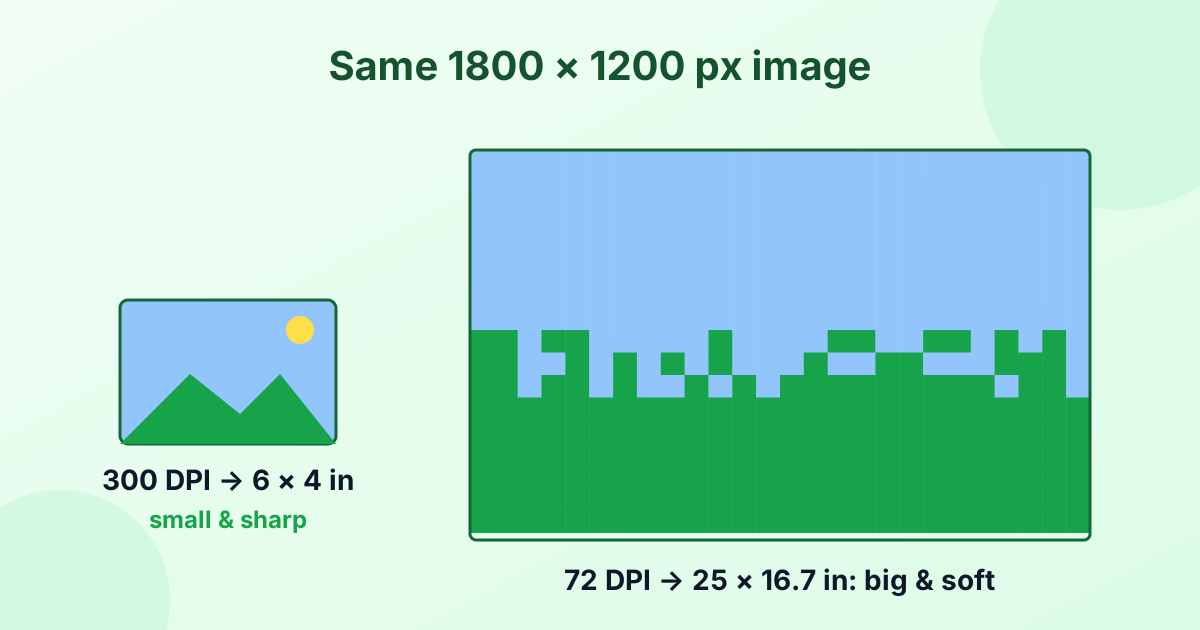
- 1920 pixels at 300 DPI = 1920 ÷ 300 = 6.4 inches
The same image can be big or small in inches. It all depends on the DPI.
Which DPI Should You Use?
| DPI | Where it's used |
|---|---|
| 72 | Old Mac screens, a common default in image files |
| 96 | Windows screens, web design, CSS (1 inch = 96 px) |
| 150 | Draft prints, large posters viewed from a distance |
| 300 | Photo prints, magazines, brochures (the print standard) |
| 600 | Fine art prints, line art, scanned documents |
For screens, DPI doesn't change how big an image looks. Screens just show pixels. DPI only matters when you print. Learn more in What is DPI?
Pixels to Inches Chart
| Pixels | at 72 DPI | at 96 DPI | at 300 DPI |
|---|---|---|---|
| 100 px | 1.39 in | 1.04 in | 0.33 in |
| 300 px | 4.17 in | 3.13 in | 1 in |
| 600 px | 8.33 in | 6.25 in | 2 in |
| 1080 px | 15 in | 11.25 in | 3.6 in |
| 1200 px | 16.67 in | 12.5 in | 4 in |
| 1800 px | 25 in | 18.75 in | 6 in |
| 1920 px | 26.67 in | 20 in | 6.4 in |
| 2400 px | 33.33 in | 25 in | 8 in |
| 3000 px | 41.67 in | 31.25 in | 10 in |
| 4000 px | 55.56 in | 41.67 in | 13.33 in |
Pixels to Centimeters
One inch equals 2.54 cm. So to get centimeters:
cm = pixels ÷ DPI × 2.54
Example: 1200 px at 300 DPI = 4 inches = 10.16 cm. The calculator above shows cm and mm automatically.
Will My Photo Print Well at This Size?
A quick rule: divide your pixel width by 300. That's the largest size, in inches, that prints at top photo quality.
- A 12 MP phone photo (4000 × 3000 px) prints sharply up to about 13 × 10 inches.
- At 150 DPI, it can go up to 26 × 20 inches for a poster seen from a distance.
Need the reverse? Use our inches to pixels converter. Want to change the DPI stored in your file? Try the DPI changer.
Frequently Asked Questions
How many pixels are in an inch?
It depends on the DPI. At 96 DPI (screens), 1 inch = 96 pixels. At 300 DPI (print), 1 inch = 300 pixels.
How do I convert pixels to inches?
Divide the number of pixels by the DPI. For example, 600 px ÷ 300 DPI = 2 inches.
Is DPI the same as pixels per inch?
In everyday use, yes. Strictly, PPI is for screens and digital images, while DPI is for printer dots. Most software uses them the same way.
How many inches is 1920 pixels?
At 96 DPI, it's 20 inches. At 300 DPI, it's 6.4 inches.
What DPI should I use for printing?
300 DPI is the standard for sharp photo prints.