Instagram Image Sizes and Dimensions (2026 Guide)
Posting the wrong size means awkward crops and blurry photos. Here are the right Instagram dimensions for every format, and how to resize your photos to fit.
Instagram Sizes at a Glance
| Format | Best size (px) | Aspect ratio |
|---|---|---|
| Portrait post (recommended) | 1080 × 1350 | 4:5 |
| Tall portrait post | 1080 × 1440 | 3:4 |
| Square post | 1080 × 1080 | 1:1 |
| Landscape post | 1080 × 566 | 1.91:1 |
| Story | 1080 × 1920 | 9:16 |
| Reel | 1080 × 1920 | 9:16 |
| Reel cover | 1080 × 1920 (shows 1080 × 1440 in grid) | 9:16 |
| Profile picture | 320 × 320 (shown as a circle) | 1:1 |
| Carousel | Same as the first image (1:1, 4:5 or 3:4) | — |
Sizes change
Instagram updates its layout from time to time. In 2025, the profile grid switched from square tiles to taller 3:4 tiles. Always check how your post looks in the app before publishing.
What Is the Best Instagram Post Size?
For most posts, use 1080 × 1350 pixels (4:5). Here's why:
- It takes up more screen space in the feed than a square post.
- More space means more attention, which often means more likes and comments.
- It fits the profile grid with only a small crop.
Use square (1080 × 1080) for graphics and quotes, and landscape only when the subject truly needs width, like a group shot or a skyline.
Instagram Aspect Ratios Explained
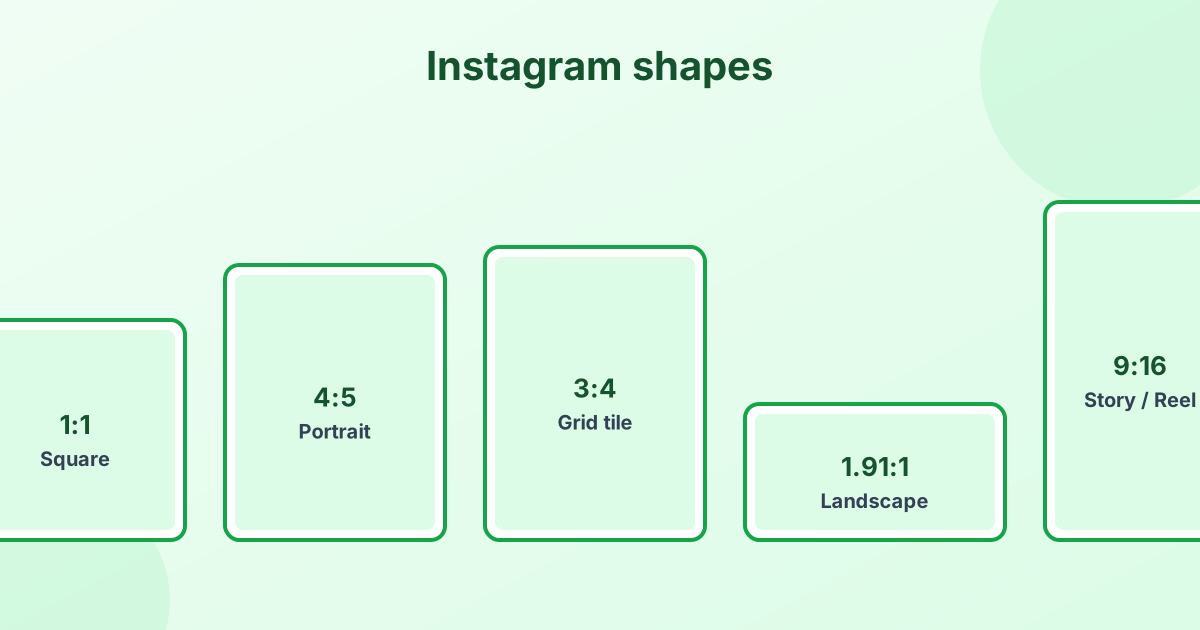
The aspect ratio is the shape of your post. Instagram supports any ratio between 1.91:1 (wide) and 4:5 (tall) for feed photos. If you upload something outside that range, Instagram crops it.
- 1:1 – the classic square
- 4:5 – the tallest portrait for a standard feed post
- 3:4 – the new grid tile shape
- 1.91:1 – the widest landscape allowed
- 9:16 – full-screen vertical, for Stories and Reels
Instagram Story Size
Stories are full-screen: 1080 × 1920 px (9:16). Keep text and faces away from the top and bottom 250 pixels or so. That's where your profile name, reply bar and buttons appear.
Instagram Profile Picture Size
Upload at least 320 × 320 px. Instagram displays it as a small circle, so keep your face or logo in the center. Our circle crop tool shows exactly how it will look.
Why Does Instagram Make My Photos Blurry?
Instagram compresses every upload. You can't stop it, but you can help:
- Upload at 1080 px wide. Smaller images get stretched. Much bigger images get shrunk harder.
- Use the right ratio. If Instagram has to crop or resize, quality drops.
- Use JPG or PNG under 8 MB.
- Turn on high-quality uploads in the app's Settings > Data usage and media quality.
How to Resize a Photo for Instagram
- Open our free image resizer.
- Add your photo and pick Instagram post or Instagram portrait from the Preset menu.
- Choose Crop to fill so the image fills the frame.
- Click Resize and download.
Want to choose exactly what stays in the frame? Use our crop tool with a 4:5 or 1:1 ratio first.
Frequently Asked Questions
What size is an Instagram post?
The recommended size is 1080 × 1350 pixels (4:5). Square posts are 1080 × 1080.
What is the Instagram post ratio?
Feed posts can range from 1.91:1 landscape to 4:5 portrait. 4:5 is the most popular choice.
What size is an Instagram story?
1080 × 1920 pixels, a 9:16 ratio.
What size should an Instagram profile picture be?
At least 320 × 320 pixels. It shows as a circle.
How do I post a full photo on Instagram without cropping?
Resize it with "Fit inside" in our image resizer. It adds borders so the whole photo fits a 4:5 or 1:1 frame.